
David Runnding
Game/Level Designer
About the Project
Role: Level/Gameplay Design
Perspective: First person
Genre: Multiplayer/FPS
Tools: Unreal/Diversion
Time: 7 Weeks
Team Size: Solo
Introduction
I've always had a passion for team-based multiplayer games. I chose to recreate a project similar to Counter-Strike in Unreal Engine. Instead of building a map in Source, the goal is to design and implement core gameplay systems, including replication for multiplayer. Counter-Strike levels is a good practice to balance routes, chokepoints, covers and angles for each team.
The overall goal is to explore how level design and gameplay systems work together to create clear player feedback with tactical FPS gameplay.
Level Intentions
-
Clear, readable combat spaces
-
Balanced relationship between chokepoints, covers and sightlines
-
Multiple viable objective routes to support strategy
-
Rotation routes designed with time and risk in mind
Gameplay Intentions
-
Clear player feedback for hits, damage and outcome
-
Controlled combat pacing (tension vs action)
-
Consistent line of sight rules
-
Modular weapon system for fast iterations on damage, accuracy and fire rate
Level Design
Initial Layout
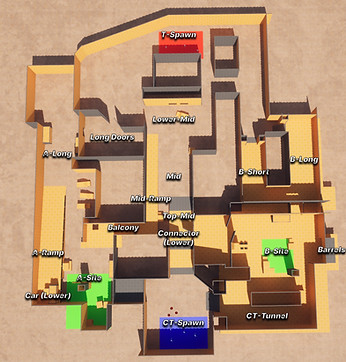
The first layout focuses on establishing bomb sites, routes, choke points, and combat spaces. It is designed to explore flow, potential combat areas, and how rotations and sightlines support tactical decision making.
This layout serves as a foundation for further iterations and will be refined through playtesting and feedback.
Cover Metrics
After completing all the player movement and animations, I created a metric system for covers. Each cover height is designed to support different levels of exposure, visibility, and risk.
-
Full Cover: Covers in any movement state and breaks line of sight
-
Medium Cover: Covers while crouched, option to peek over while standing
-
Low Cover: Partial exposure while crouched, enabling peeking over cover with the option to fully hide by looking down
This is to ensure clear and consistent rules for cover, giving players ways to manage exposure and decision making.

Gameplay Design
Player Movement & Animations
I started by defining the core movement states I wanted the player to have, each affecting speed, visibility, and how much information they give away through sound:
-
Running (default): full speed, generates footsteps
-
Walking: reduced speed, silent movement
-
Crouching: reduced speed, silent movement, lower profile
To support these, I used blend spaces to make transitions between idle and movement feel smooth and responsive. The goal wasn’t just visual polish, but to give the player better control when adjusting speed especially in situations like peeking or repositioning.
Movement Inputs switches between these states and adjusts speed accordingly, while look/aim input allows the player to control direction independently.
The intention here was to tie movement directly to gameplay and tactical decisions. Players can trade speed for information, pace for stealth and uncertainty.
Switching States
Blend space - Run
Aim Offset & Animation BP


I added aim offsets for vertical aiming (up/down), along with blending between animations based on the equipped weapon and current movement state.
This was done to improve readability in combat. By clearly showing where a player is aiming, other players can better read intent and react accordingly. This makes encounters feel more fair, as important information is communicated visually rather than guessed.
Selection Screen & Spawning System
I added a team selection system to clearly separate the teams into two sides of the level.
Each team has their own spawn points chosen at random to create diversity and some luck to gain a slight tempo advantage if spawned closer to a target route.
The design intent is to enable each team to adjust their tactical decision and create diversity in each round of play.
Shooting System
I created a shooting system for both single-shot and automatic weapons. I have set up an event that runs every X amount of seconds depending on the weapons individual fire rate when holding down the button. This way the weapons works the same but the spray speed can be increased or decreased with a single variable.
At the moment, pistols are limited to single-shot firing as a design choice, while rifles can spray continuously. This is something I want to change and set up a check whether the weapon is sprayable or not.
Weapon Info - Data Tables
To increase scalability and easier implementation for weapons, I created weapon data system using a Data Table and google sheets.
Each weapon gets its data from a function with properties like damage, ammo capacity, animations, vfx and a lot more.
The intention is to be able to balance the weapons quickly and to easily be able to add more weapons easily without adding more code.
Upcoming
Detailed breakdowns take time to document, I will continue expanding this page as the game progresses. In the meantime, I will add completed features that doesn't have their own section in a list:
-
Weapon Switching
-
Player health, death & respawn